
Gathering IRS records for all businesses, relies on the individual who is signing for that business. Your clients may have signing authority for some businesses and not others. Businesses can take many forms, including:
- Sole Proprietorships
- Partnerships
- Corporations
- Trusts
- Estates
The process to get consent for IRS business records starts with the individual.
Have the business signer complete the consent flow using your link first - this gives you access to their individual financials. When their information comes in, select View Financials to see what businesses they have authority to sign for. Check the boxes next to those businesses.
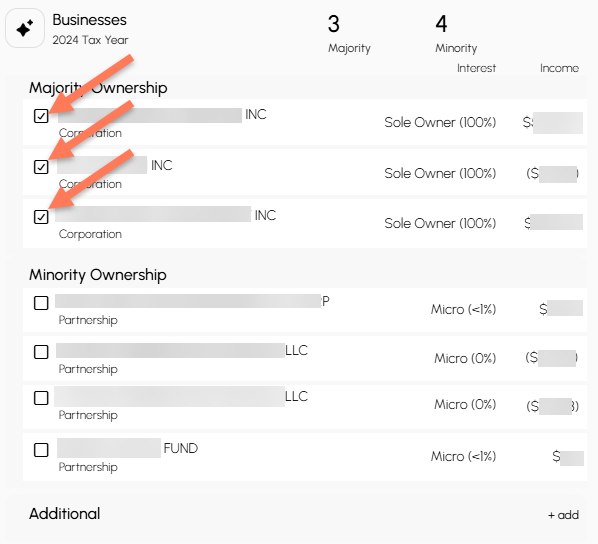
Send them your consent link AGAIN so they can consent for those businesses. They will be directed to add their Title as on file with the IRS. No further evidence of their signing authority is needed.
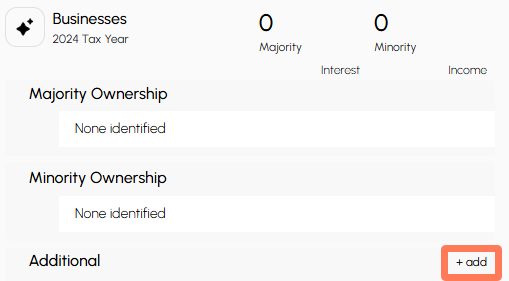
If you need to add a business that does not appear on their IRS-provided financial records, you can enter business information manually by clicking +add at the bottom of their business field.
A pop-up will open. Complete the required fields and upload verification that this individual has signing authority for the business.
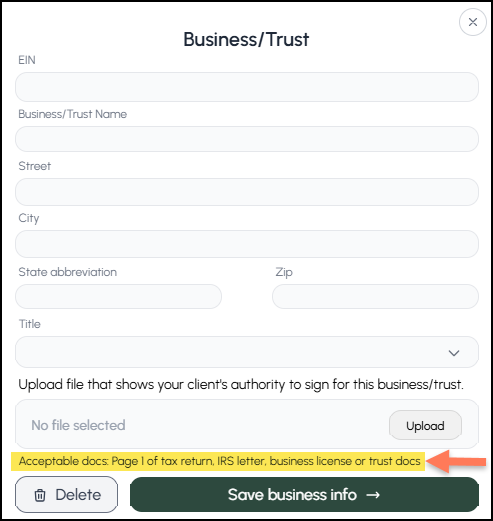
Check the boxes next to ALL added businesses you want them to sign for - this may include businesses verified by the IRS and businesses verified by you. Send them your consent link. They can sign for multiple businesses at the same time.