
Turning on Alerts means you receive an email when new activity is logged on a client's IRS records. Once Alerts are on, TaxStatus watches for changes from the original files delivered by the IRS, so you hear about them without logging in to check.
Why Turn on Alerts
- Catch issues early. Learn about new IRS notices, balances due, or account changes as soon as they post, not weeks later.
- Act before deadlines pass. Earlier notice gives you and your client more time to address potential issues.
- Show proactive service. Reaching out first with a heads-up builds trust and sets your firm apart.
- Save time. No need to open each taxpayer's records to look for changes. Updates come to your inbox.
- Stay focused. Because Alerts are turned on per taxpayer, you only hear about the clients you choose to watch.
Before You Begin
- The taxpayer must have IRS records available in TaxStatus. Alerts track changes from the original files delivered by the IRS.
Turn On Alerts for a Taxpayer
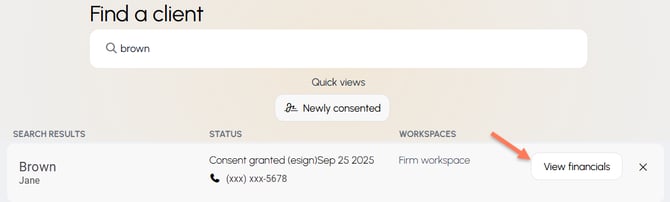
Choose View financials for the client of interest.
Visit the IRS Records & Activity tab.

In the IRS Account Activity section, click the button to turn Alerts on/off.


Repeat these steps for each taxpayer you want to watch.
What Happens Next
TaxStatus now watches that client's IRS records. When the IRS logs new activity, an email Alert is sent to you. Each Alert covers all IRS activity for the taxpayer, so there are no topics to set up or manage.
To stop Alerts, return to the client's IRS Account Activity section, click the Alerts button to turn them off.
Tips: Start with
- your highest-priority clients
- clients with open IRS matters, recent notices, or balances due.