
If you are a tax professional with an IRS-assigned CAF (Centralized Authorization File) number and have access to TDS (Transcript Delivery System) through eServices, follow these simple steps to allow TaxStatus to download transcripts from the authorizations you have on file.
Before You Begin
- Be sure that you have your IRS login credentials.
- Test your access to the Transcript Delivery System (TDS) by pulling transcripts for a client under your authorization without needing to call the Practioner Service (PPS).
Link Your Professional Account
From your Home page, choose Workspaces.

At the left, choose Integrations, complete your CAF details exactly as they are presented on a filed Form 8821 or 2848, save. Then, choose Activate your link to IRS - this will open a new menu.
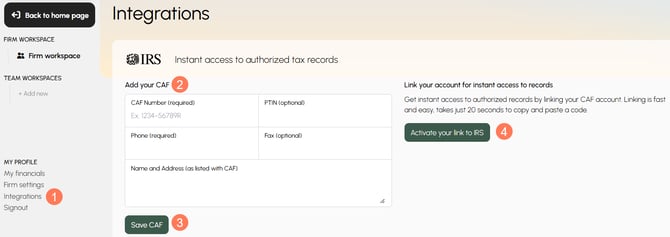
Connecting with the IRS
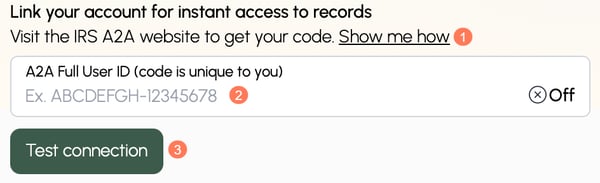
When you chose the Activate your link to IRS button in TaxStatus, a new box appears. Use the Show me how link for detailed steps to follow within your IRS.gov account.
Be sure to copy the Full User ID generated by IRS.gov so you can paste it into the TaxStatus system and Test connection.
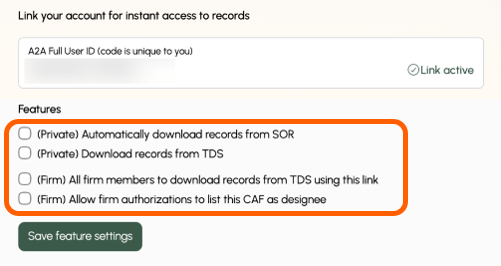
Check the boxes for the Features you want to activate & Save feature settings. At least one box must be checked for your linked account to function.
Related Articles
-
Tax Pros use IRS link to access records already authorized on their CAF.