
If you're new to TaxStatus, activate your subscription to get started.
To activate your account:
- Log in to the TaxStatus platform.
- Click the Activate tab on the left.

- Choose a subscription plan and enter your payment information to complete activation.
Once payment is confirmed, your account is active, and you'll have full access to the platform.
To change an existing subscription:
Once your account is active and you have consents, the Activate tab no longer appears on the home screen. Choose Workspaces, then Firm settings.
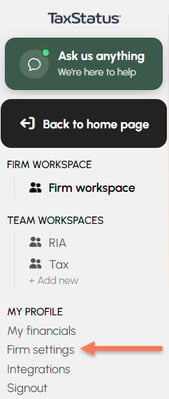
Under Plans & Pricing, you can
-
Manage your subscription to update your payment method.
-
Show plans will show you what subscription plans are currently available.
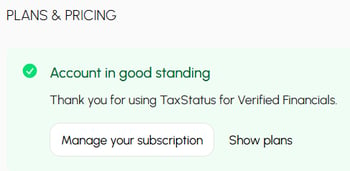
To opt into a different subscription plan, cancel your current subscription, and view the current subscription options. Your new plan takes effect immediately. No refunds or prorations are available when initiating a new plan.
If your firm is part of an Enterprise subscription:
You'll see a message indicating your account is covered under an Enterprise agreement. No payment action is needed on your end — your firm's administrator manages billing centrally.
