
You may have clients who are not proficient with technology or who simply feel more comfortable signing a form with a pen in hand. TaxStatus accepts forms generated from within our system that are wet-signed by your client.
Tips:
-
A wet signature means the person must physically sign the form using a pen.
-
Electronic signatures, including digital signatures and services like DocuSign are not accepted by the IRS.
- Signatures must be a full, legible name; initials are not accepted by the IRS.
- All signers must be individuals. A business/entity cannot sign on behalf of another business/entity.
Before You Begin
Make sure you have the following information ready:
- The client's full details (legal name, tax ID number, phone number, address used on the last filed federal tax return, etc.)
- Relevant supporting documentation if you are creating a Special use case form
- If you choose the wet-signature method, please maintain identity validation documents in your files.
Prepare a wet signature form
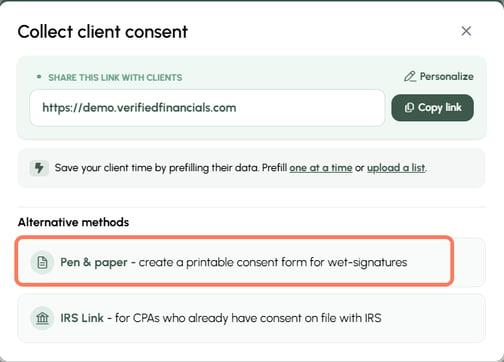
To get started, from your Home screen or Dashboard, click the Client consent options button. In the pop-up, choose the Pen & paper option.

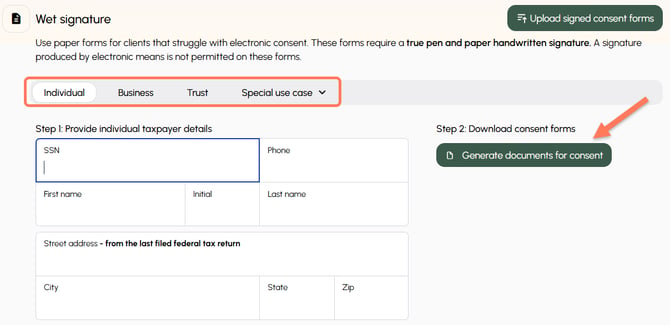
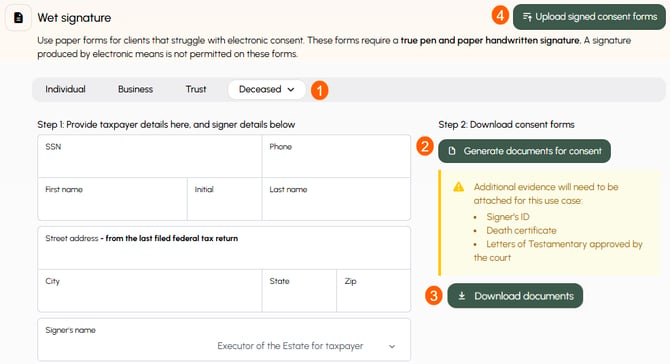
- Select the type of wet-signed form and complete the required information.
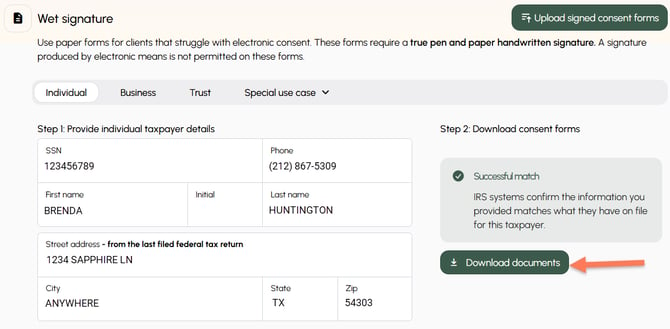
- Generate documents for consent - This pings the IRS to perform a preliminary check that the information provided matches their records. See below for more information.
- Download documents to your computer and provide them to your client to wet-sign.
- Once signed, return here to upload the signed form.

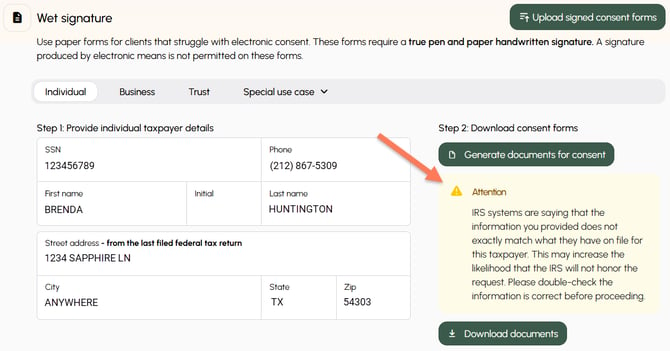
Preliminary Check Mismatch
When you click Generate documents for consent, the TaxStatus system performs a preliminary check of the information you provided against the IRS systems. You will be alerted if there is a mismatch.
If you feel that the most accurate information has been entered, you may proceed to Download documents.
Special Use Cases
For Special use cases, follow these steps:
- Choose the special use case type from the dropdown and complete the required information.
- Generate documents for consent.
- Download documents.
- Once signed, return here to upload the signed form and the supporting documents.
Tip: The signer must be an individual. It cannot be a business or entity.
Please note that documents with a wet signature require manual QA review before they are accepted and become visible in the system. As soon as they are approved, they will be visible in your TaxStatus dashboard.
Form Submission Requirements for IRS Acceptance
-
A wet signature means the person must physically sign the form using a pen.
-
Full signatures are required – initials are not accepted.
-
The signature date must be clear, legible, and within 90-days of submission.
-
Uploaded files must be clear, readable, and well-lit.