
Schedule K-1 income can be easy to miss on a return if you don't know where to look. This article covers what a Schedule K-1 is, when that data typically becomes visible on a taxpayer's IRS transcript, and how to find it inside TaxStatus using the Wage and Income Transcript, the K-1 Report, and the Tax Prep Checklist.
Before You Begin
- The taxpayer must provide consent to release their records to TaxStatus to be shared with your firm.
- Send the client your consent link and wait for the IRS to approve the request submitted by TaxStatus. .
- For married couples filing jointly, the K-1 is unique to the person listed on that form. It is important to collect consent from both spouses to gain complete information for a couple.
Tips
- It is best practice to collect transcripts for both spouses, even if they are married filing jointly - this allows visibility into all income sources.
- A Schedule K-1 will post to a client's IRS record AFTER the entity's return (and any extension) has been processed.
What Is a Schedule K-1?
Schedule K-1 is the tax form that a pass-through entity — a partnership (Form 1065), an S corporation (Form 1120-S), or an estate or trust (Form 1041) — issues to each partner, shareholder, or beneficiary to report that person's share of the entity's income, losses, deductions, and credits for the year.
Each K-1 recipient reports their share of income and pays tax on their personal return, generally via Schedule E. The entity also files a copy of every K-1 with the IRS, along with its own business return.
Because a taxpayer's K-1 income can come from one or several entities, it's a common source of underreported income and refund delays when missed during tax prep.
When do K-1s post to a taxpayer's IRS transcript?
K-1 data posts on a taxpayer's Wage & Income Transcript. The entity issuing the K-1 has its own filing deadline, which is often extended. Therefore, Schedule K-1s generally post to a taxpayer's transcripts later than most other information returns.
- Partnerships (1065) and S corps (1120) file on an original due date of March 15, but routinely extend to September 15.
- Estates and trusts file Form 1041 with an original due date of April 15, extendable to September 30.
- The IRS doesn't post the underlying data to a taxpayer's transcript until after the entity's return (and any extension) has been processed. For this reason, it may not appear on a Wage and Income Transcript until late summer through fall of the year following the tax year in question.
The K-1 Detail report and the form-specific Information Returns are built to help you track what is available, so nothing gets missed once the data posts.
What happens if a K-1 is not appearing?
If you notice that a client had more K-1s in a prior tax year than have been posted for the most recently completed tax year, you may want to confirm if they still have a share in the entity of interest.
Finding K-1 Data in TaxStatus
Schedule K-1 information can be found in multiple areas of the TaxStatus system — the K-1 Detail report, the Wage and Income transcript, and the Tax Prep Checklist.
K-1 Detail Report
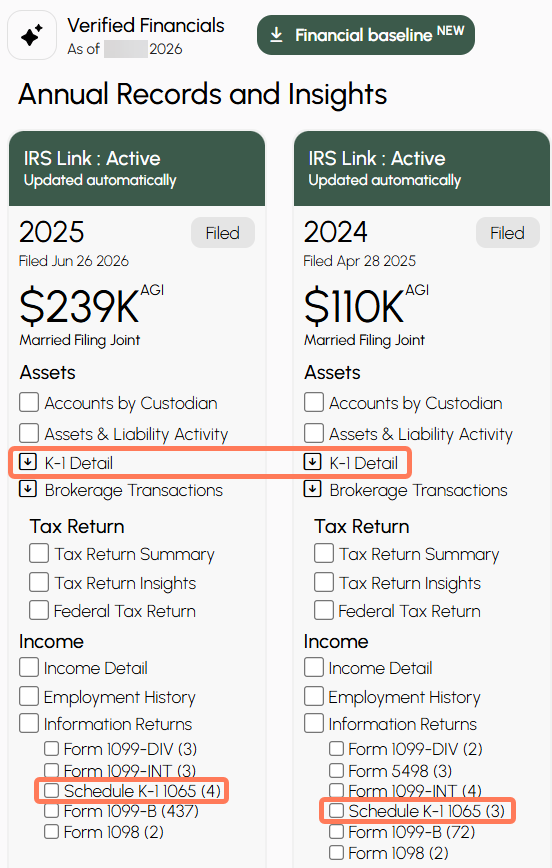
This report surfaces every K-1 the IRS has on file for that taxpayer for the selected year, organized by K-1 issuer type (Partnership/Corporation/Fiduciary).- As pictured above, the K-1 Detail report is found in the Annual Records and Insights on the client's financials page. From the client's record, open the K-1 Detail report.
- Each row represents a separate K-1 and lists the basic transactional data derived from the pass-through entity and issued to that individual. The specific information provided varies by K-1 type but may include the issuer's name and address, the recipient's ownership percentage, income, interest, dividends, capital gains, nonrecourse amounts, etc.
Wage and Income Transcript or Form-Specific Information Return
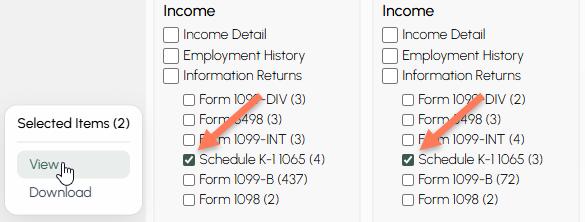
The Wage and Income Transcript, in full or portions of it, is also found in the Annual Records and Insights on the client's financials page.
-
In the client's record, check the boxes next to the relevant tax year Schedules, then view or download to review.
- If the year is recent and it appears that some K-1s are missing, it is possible that the form has not yet processed (see "When do K-1s post" above).
Tax Prep Checklist
The Tax Prep Checklist is a list of documents custodians have reported to the IRS over the two most recent tax years, so you and your clients can see what is likely needed for the upcoming tax filing season.- Schedule K-1s will appear in the Business & Partnership Income area of the report.
- The checklist renews each year.
-
Your clients can mark each item as received on the checklist, so all income sources are accounted for before they hand the records off to their CPA.
Tips
- Don't assume a missing K-1 line means the client had no pass-through income — check whether the issuing entity filed or extended before flagging it as an error.
- If a client typically receives K-1s from the same entities each year, note that pattern on their checklist so it's easy to spot a missing one next season.
- The K-1 Detail report is the faster path when you need a thorough summary. Use the full Wage and Income Transcript to see the information exactly as on file with the IRS.