
Why would I want to use a workspace?
- Workspaces let you organize your firm's clients into groups, like folders.
- You control which team members see clients in each workspace.
- Workspaces help you organize and segment clients within your firm.
Create a new workspace
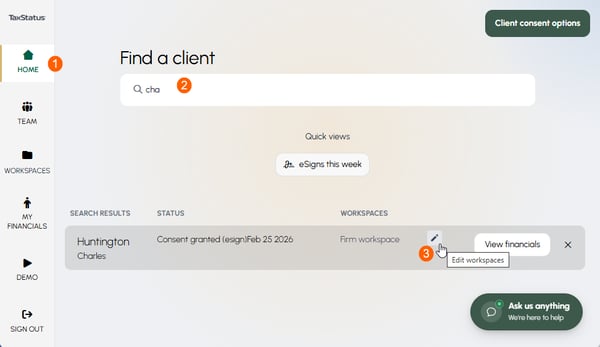
- From your Home screen
- Search for a client - you can search by name, nickname, partial name, or partial tax ID,
- Hover over the current workspace(s). Click the pencil to edit.
- Name the new workspace, and click Add.
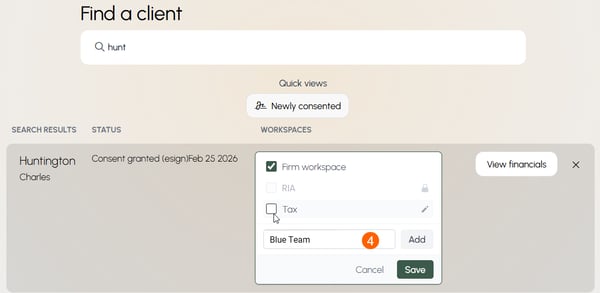
To add or move a client between workspaces and control who can see them, see Adjust Client Visibility.
Include team members in your workspace
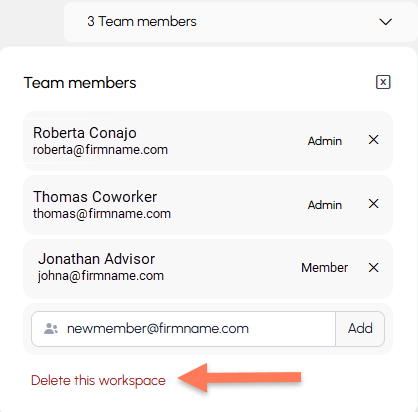
Add/remove team members to give them visibility into clients in this workspace.
For more detailed instructions, see Workspace Team Members.
.png?width=418&height=412&name=image%20(15).png)
Delete a workspace
To remove a workspace, simply click Delete this workspace, as seen below.
Related Articles